AI spend is becoming a real finance problem. Price check, please.
For the last couple of years, most companies could treat AI as experimentation. Let’s max out on tokens!
Employees signed up for ChatGPT or Claude, engineering teams started using AI coding tools, and AI capabilities appeared inside existing software tools. The dollars were often small enough that finance did not need a dedicated budgeting or control process.
That has changed.
AI spend now cuts across software budgets, departmental operating expenses, and engineering costs. Predictable seat-based pricing is also being supplemented by tokens, credits, API calls, usage-based pricing, and other consumption models.
The result is a new problem for CFOs: AI can become a material operating expense before finance has the infrastructure to track or manage it.
How Should CFOs Manage AI Spend?
Start with five steps:
Track → Attribute → Benchmark → Govern → Measure
First, consolidate AI costs across providers and establish a budget. Next, attribute those costs to departments, employees, models, API keys, or workflows where the data allows. Establish reasonable usage benchmarks, put spending and model controls in place, and only then start connecting AI spend to output and ROI.
The goal is simple: move AI from an unpredictable invoice into a budgeted operating resource that finance can forecast and manage.
This is all possible today, but you probably can’t vibe code this data stack.
1. How to Build an AI Budget
The first problem is visibility.
If I am building a 2027 budget, I need to know what we are spending on AI today before I can forecast next year. You don’t know where you are going until you know where you have been. My FP&A tip.
Start by creating an inventory of material AI-related spend. Include the obvious AI vendors, but also look for AI costs embedded inside existing software and any inference or API costs tied directly to your product.
For each material vendor, capture:
- Current monthly run rate
- Department owner
- Pricing model
- Contract and renewal date
- Fixed versus usage-based spend or hybrid
- Internal use versus customer-facing product delivery
- Available usage and user-level data
Separate Internal AI Spend From Product AI Costs
This is a big one.
Internal employee AI usage should generally follow the department consuming it. AI costs required to deliver your customer-facing product belong in COGS / Dev Ops.
If an R&D employee uses an AI coding tool, that expense belongs with R&D. If marketing uses AI for content workflows, the cost belongs in marketing.
This is similar to other internal-use software. The expense should follow the people and function consuming the resource rather than automatically getting dumped into G&A.
Customer-facing AI is different.
If model calls, inference, APIs, vector databases, or other AI infrastructure are required to deliver your product, those costs may in COGS. That classification affects gross margin and eventually your AI unit economics.
The important first step is to stop letting material AI spend disappear inside generic software or cloud hosting accounts.
Forecast the Drivers of AI Spend
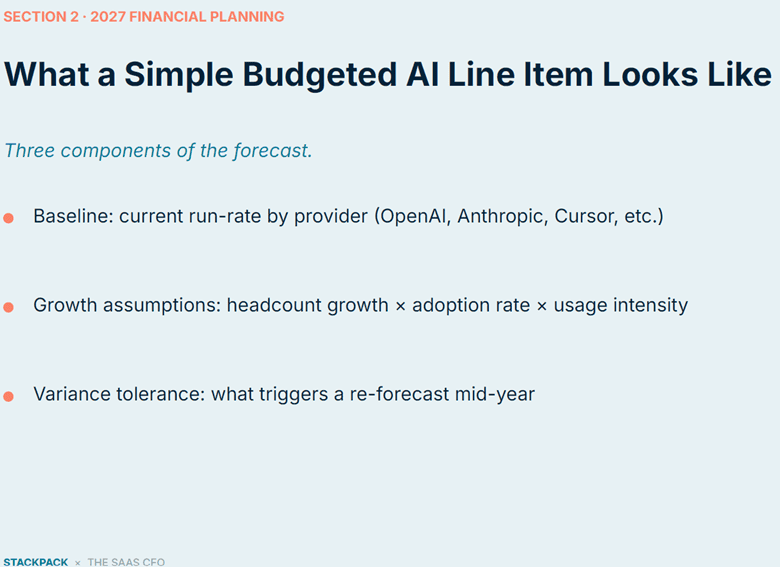
A practical AI forecast can start with three components:
Baseline: Current run rate by provider
Growth assumptions: Headcount growth × adoption rate × usage intensity
Variance tolerance: What level of spend variance triggers a reforecast
This is basically rate-volume (from my airline FP&A days) analysis applied to AI.
Your engineering headcount might grow 15%, but AI spend could grow much faster. More existing employees may adopt AI. Current users may become heavier users. Automated workflows may execute more frequently. And your mix of inexpensive versus frontier models can change.
A simple headcount growth assumption will miss those dynamics.
AI Budget Action Items
- Pull the last 6–12 months of AI-related spend.
- Identify your major AI providers.
- Separate internal AI usage from customer-facing AI product costs.
- Map material expenses to department owners.
- Identify fixed versus consumption-based costs.
- Build assumptions for headcount, adoption, and usage intensity.
- Set a variance threshold that triggers a reforecast.
You do not need sophisticated software to begin. A clean spreadsheet is much better than leaving AI buried in one expense bucket. But you do need more GL accounts! Don’t resist.
2. How to Track AI Spend by Department, Employee, Model, and API Key
Knowing the company spent $250,000 on AI last year is not very useful for FP&A. Or your Board or your investors.
I need to know where that spend occurred and what drove it.
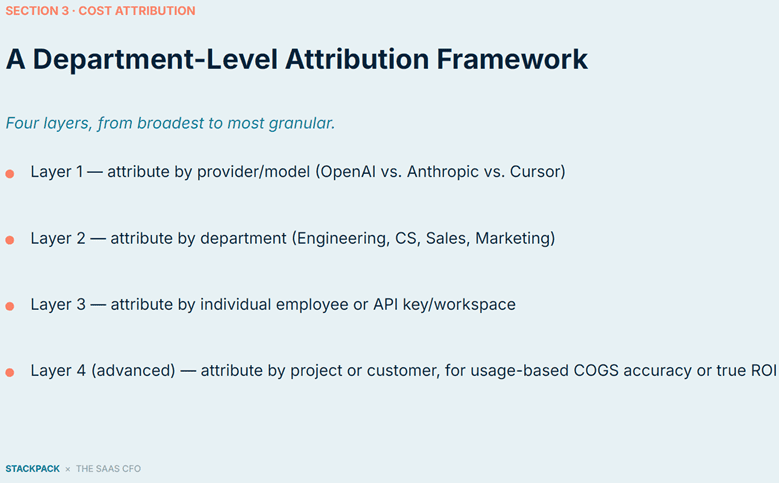
AI cost attribution can progress through four levels:
Provider / model → Department → Employee or API key → Project or customer
That last layer becomes particularly important when AI is part of your customer-facing product and you need customer-level COGS and AI unit economics.
What AI Spend Can Companies Track Today?
Depending on the provider, plan, and your own data infrastructure, companies can potentially track AI spend and usage by:
- Provider
- Model
- Department
- Individual employee
- Workspace
- API key
- Application
- Workflow
- Project
- Customer
You may not get all of that directly from one vendor.
That is where finance needs to understand the underlying AI plumbing.
A provider may expose usage by user, workspace, or API key. Finance can then map that identity back to the employee and department.
For example:
Provider usage data → user/API key → employee → department → budget
If multiple teams share one API key, attribution becomes difficult. Just like Product ID’s, who manages your internal API keys? Creating separate API keys by department, application, or major workflow can give finance much better cost visibility.
The same principle applies to workspaces and enterprise accounts. The cleaner the identity structure is upstream, the easier it becomes to assign the expense downstream.
User-Level Data Still Varies by Provider and Plan
This is an important limitation.
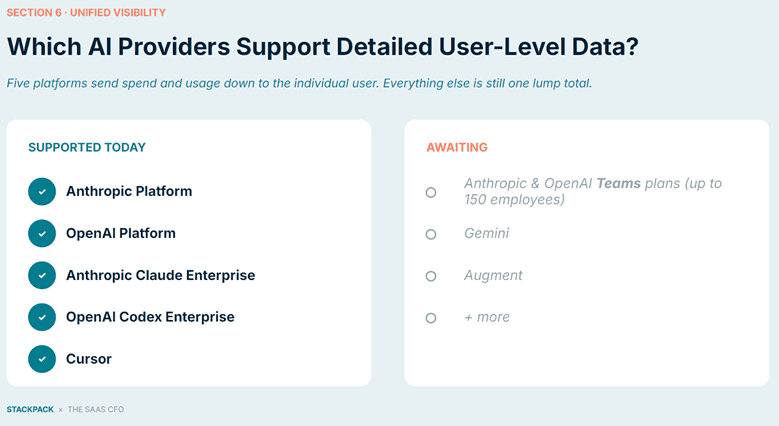
At the time of our webinar, Stackpack showed detailed user-level spend and usage support for:
- Anthropic Platform
- OpenAI Platform
- Anthropic Claude Enterprise
- OpenAI Codex Enterprise
- Cursor
Other providers and plans still offered less granular data.
The takeaway for finance is not to wait for perfect data. I see this a lot with SaaS metrics students. You have to dive in, ready or not.
Start at the lowest reliable level available.
If you can only allocate one provider to the engineering department today, start there.
If Cursor gives you employee-level usage while another platform only provides workspace totals, use the best available data for each provider.
Your attribution process can become more sophisticated over time.
Why Department-Level AI Attribution Matters
Department attribution alone is already useful.
If engineering is spending $40,000 per month on AI and marketing is spending $8,000, those costs should flow into the appropriate departmental forecasts.
Finance can then apply familiar FP&A disciplines:
- Budget versus actual
- Forecast versus actual
- Month-over-month variance
- Spend per employee
- Spend by provider
- Spend by model
- Spend by workflow
At a minimum, finance should work toward answering six questions:
- Which AI providers are we paying?
- Which departments own the spend?
- Which employees, API keys, or workflows drive the most consumption?
- Which models are generating the expense?
- Which costs support internal operations?
- Which costs support customer-facing product delivery?
The objective is not to find the biggest user and tell them to stop.
The objective is to understand the economics behind the usage.
3. How to Benchmark AI Usage and Spend
Once AI costs are attributed, finance can start asking a more useful question:
What does normal AI usage look like?
A company-wide AI-spend-per-employee KPI can be misleading because different functions should have very different consumption patterns.
An engineer may legitimately use substantially more AI than someone in HR. Even within engineering, an AI-heavy development team could look completely different from another product group.
That is why I prefer cost bands by role or department instead of one company-wide average.
Stackpack’s customer data presented during our webinar showed average annual AI spend rising from approximately $34K in December 2025 to $44K in June 2026. The overall dataset averaged roughly $500 of annual AI spend per FTE, but the spending patterns varied significantly by department.
Treat those numbers as directional context, not a universal target. And once you have enough data, you’ll be able to create your own internal benchmarks.
Start With Internal AI Benchmarks
Before obsessing over external benchmarks, establish your own internal baseline.
A simple framework could look like this:
| Function | What to Monitor |
| Engineering | AI spend per engineer, model mix, cost per output |
| Sales | AI spend per rep, activity or pipeline supported |
| Marketing | Spend by workflow, content or pipeline output |
| Finance | Spend per user, hours saved, processes automated |
| Operations | Spend versus transactions or workflow output |
After several months of data, you can establish reasonable usage bands for different roles and teams.
Then investigate exceptions on both ends:
- Users materially above the expected range
- Departments with rapidly increasing spend
- Expensive models being used for simple tasks
- Employees or teams with very little AI adoption
- Large increases in spend without corresponding changes in output
The goal is to distinguish high-value, high usage from runaway usage.
Someone spending 10 times the department median could be your biggest problem.
Or they could be your most productive AI user.
Spend alone will not tell you which one. Got to get out of your cube and go talk face-to-face.
4. How to Control AI Spend Without Killing Adoption
Once finance can see and attribute AI spend, you can put practical controls around it.
This does not mean finance should become the AI police.
The objective is to help employees use the appropriate resource for the job and catch unexpected spending before the invoice arrives.
Create Model-Usage Guidelines
One easy way to waste money is model selection. I’ve been testing this a lot with my internal workflows.
Without guidance, employees may default to the most capable and often most expensive model even when a cheaper model handles the task perfectly well.
I would start with a simple framework.
Routine work
- Email drafting
- Summarization
- Simple research
- Classification
- Straightforward content work
Use a lower-cost model when the output is sufficient. Gemini has some pretty cheap models.
Complex work
- Detailed analysis
- Coding
- Financial reasoning
- Large-context tasks
- Higher-value decision support
Use a more capable model when the incremental output justifies the incremental cost.
The policy does not need to be complicated.
It needs to answer one practical question for employees:
When should I use what?
Set AI Spending Alerts
Traditional software contracts are relatively easy to budget. If a contract costs $100,000 annually, finance knows the expense.
Consumption-based AI behaves differently.
A new workflow can suddenly increase token consumption. An automated process can run far more often than anticipated. A department can change its model mix. One API key can unexpectedly spike.
If finance only discovers the change when the invoice arrives, the control came too late. The usual stuff.
Useful alerts might include:
- 80% of a monthly department budget consumed
- 90% of a monthly department budget consumed
- Individual usage materially outside the expected range
- Significant month-over-month spend increase
- Large shift toward more expensive models
- Unusual API or token spikes
- New AI vendors appearing in expenses
AI spend should also become part of the normal monthly department review.
This should not be a once-a-year budgeting exercise.
5. How to Measure ROI on Internal AI Spend
Only after finance has visibility, attribution, benchmarks, and controls would I move into ROI.
The question becomes:
Is the AI spend producing enough output to justify the investment?
A useful early framework is:
AI Spend ÷ Output
The numerator is increasingly measurable.
The denominator depends on the function and can get a bit ambiguous.
Examples include:
- Engineering: tickets completed, code shipped, pull requests, releases
- Sales: meetings, opportunities, deals influenced, additional capacity
- Marketing: campaign output, content, pipeline, hours saved
- Finance: reporting cycle time, manual steps removed, hours saved
- Operations: transactions processed, workflow cycle time, service capacity
Do not pretend this creates a perfect universal AI ROI metric.
It does not, and it’s still evolving.
Use it as a consistent internal yardstick.
Start with one or two departments where output is reasonably measurable.
If AI spend doubles while output barely changes, investigate.
If AI spend rises while a department materially increases capacity, shortens cycle times, or avoids planned headcount, the economics may be very attractive.
The important step is simply connecting the expense to something measurable on the other side.
If you are not sure about department ROI, I highly recommend implementing my ROSE Metric. It will tell you at a macro level if AI is helping you scale.
Don’t Let AI Spend Hide Broken Processes
Heavy AI usage is not always a sign of AI maturity.
Sometimes it is evidence of a broken underlying process.
A team may be using AI to work around:
- A poorly implemented ERP
- Broken CRM workflows
- Fragmented systems
- Messy underlying data
- Manual processes that should have been redesigned
In those situations, AI can become a very expensive Band-Aid.
Before approving significantly more AI spend, ask:
- Is AI automating a good process or compensating for a broken one?
- Are we feeding AI clean, structured data?
- Should the underlying workflow be fixed first?
- Are we using AI for calculations that should be deterministic?
- Is poor data architecture creating unnecessary token usage?
This is particularly important in finance.
Clean and structured financial data makes AI much more useful. Use deterministic systems where the answer should be deterministic. Bring AI into workflows where reasoning, interpretation, and synthesis add value.
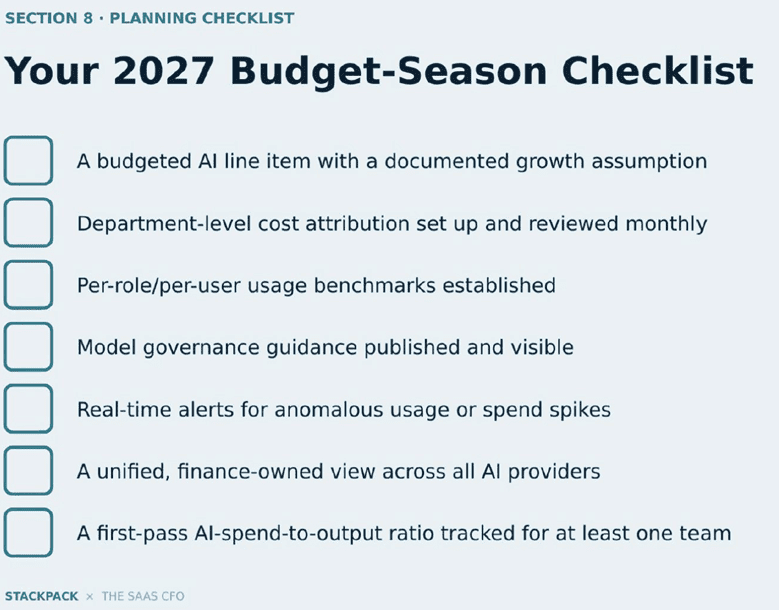
2027 AI Budget Checklist for CFOs
You do not need perfect AI unit economics before budget season.
But I would want the following foundation in place.
Track
- AI has a defined budget or expense structure.
- Current run rate is documented by major provider.
- Growth assumptions are documented.
- Internal AI usage is distinguished from customer-facing product costs.
- A reforecast threshold has been established.
Attribute
- AI spend is mapped to departments.
- Major users, API keys, workspaces, or workflows are identifiable where possible.
- Model-level usage is visible where available.
- Customer-facing AI costs are classified appropriately.
- Provider limitations on user-level visibility are understood.
Benchmark
- Cost bands exist by role or department.
- High-consumption users are reviewed.
- Low-adoption teams are reviewed.
- Benchmarks are diagnostic, not punitive.
Govern
- Model-use guidance is documented.
- Department budget alerts are active.
- Unusual spend spikes trigger a review.
- AI spend is reviewed monthly with department owners.
- Finance has a consolidated view across major providers.
Measure
- At least one major team has a defined output metric.
- AI spend-to-output is tracked over time.
- High-cost / low-output workflows are investigated.
- AI productivity is considered alongside future headcount plans.
- Use the ROSE Metric – can you beat the $1.50 test?\
The Bottom Line
The sequence matters.
Track the spend. Attribute it. Benchmark it. Govern it. Then measure the return.
Finance does not need to solve AI economics all at once.
But once those five pieces are in place, AI stops being an unpredictable invoice and starts becoming an operating resource that CFOs can budget, forecast, and manage.
Many thanks to Sara Wyman, founder of StackPack.ai, for the incredibly helpful webinar and slide deck on AI governance.
You can catch the webinar replay here.

I have worked in finance and accounting for 25+ years. I’ve been a SaaS CFO for 9+ years and began my career in the FP&A function. I hold an active Tennessee CPA license and earned my undergraduate degree from the University of Colorado at Boulder and MBA from the University of Iowa. I offer coaching, fractional CFO services, and SaaS finance courses.